Showing posts with label Curiosities. Show all posts

Sunday, 14 June 2015

App Inventor

Hello again! We've started working with App Inventor. This is a software to create and programme an Apk (mobile application). You can design and create the functions of the Apk, and try it in your mobile phone (via Wifi or USB wire), or with a computer emulator, to check if it works properly. 

To access this program you just need a google account with which you log in in the MIT App Inventor webpage. Then you'll be asked the way you want to see the application on real time. You choose it or continue without emulation.

In the main page (designer) you can choose the components from the left column and drag them to the screen in the middle. Here you just place the components of the apk and select their features in the column in the right, as you like. There are many different components, but the most important ones are the buttons, which you can press to make actions, the canvas to add images, the labels to add texts, and other not visible components like the camera or the accelerometer, which act depending on how you programme them.

In the programming page (blocks) you create the 'orders' of the apk, depending on what you want it to do. On the left you can see the different features. If you want some specific component you added in the designer to do any action, you click on its name and select the action you want. You have to combine those 'orders' or blocks in a way it makes sense and works. As I said, you can check if it works with an emulator or with your own mobile phone. As you practice you will manipulate App Inventor better, so don't get desperate at the beginning.

We've had to create two apps. The first one is a photo painter. You can take a picture or take it from your gallery, and paint on it with different colors. You can download it to try it here.

The second one is a questioning game. You are asked a question and you have to answer it. Depending on how you answer it will congratulate you or you will have to try again. I already have to finish and improve it, but you can download it here.

I hope you liked, I think this is very entertaining if you like computing, so I encourage you to try it.

On the other hand this may be the last post about my IT lessons, because this is the last year I can have this subject and the course is finishing, but I will try to post something from time to time. Have a great summer.

Monday, 23 March 2015

Arduino

To end this term we've been working with Arduino. Arduino is an open-source electronics platform based on easy-to-use hardware and software. It's intended for anyone making interactive projects and it's mainly composed by a software and a board shield, supplemented by several means. This project was created in around 2005 by a group of people related with the Italian Interactive Design Institute Ivrea, to create a more affordable and accessible free hardware device, compatible with most operative systems. Now there are discussions about the licensing of Arduino between its creators but this project is a great mean for education and development so I hope we will still be using it in schools for long.

In our high school we have several Arduino materials with which we create interactive gadgets. Then with our creations we participate in a technology fair. But, to get started on it, we at first make simple projects. We've made two projects until now. You can see the information about them in the Verkstad Creative Technologies webpage, in the second and third blocks.

The first project consisted on a sport or game. My group made REACT. It consists on a sequence of LEDs that come on light aleatory and you have to push the corresponding capacitive sensor rapidly to continue playing. You can see the information here:


The second project consisted on a "magic" gadget. My group made POV, which consists on a line of LEDs on the shield which come on light depending on how you program them, so that when you make it turn rapidly or you move it rapidly, you can see words or symbols on it, and it is so cool. You can see its information here:


I hope you liked, I'll upload more information and images about this if we continue working with Arduino. Have nice Easter holidays!

Golden Ratio in design

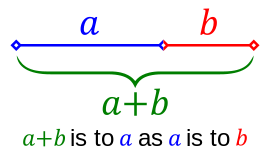
We've been asked to write something about the Golden Ratio in design. This amazing term is the one which appoints the proportion between two quantities when their ratio is the same as the ratio of their sum to the larger of the two quantities, and you can see it better in this image:


This ratio can be obtained from the division between two consecutive numbers from the Fibonacci progression (Fibonacci or Leonardo of Pisa was an Italian mathematician from the XII and XIII centuries), whose numbers are obtained through the addition of the two previous numbers of the succession (1,1,2,3,5,8,13,21,34,55,89,144...). This division has a result of roughly 1.618.
Golden Ratio in nature

This ratio appears naturally in several aspects of nature as the position of some plants' leafs or petals, the shape of shells, galaxies, reproduction of rabbits... Even the entire human form may be broken down into a series of Golden Ratios.

But, appart from that, many designs are based on the Golden Ratio, as it is considered as a beautiful proportion to see. Some examples are the shapes of credit cards, postcards, playing cards, posters, wide-screen televisions, photographs, light switch plates and cars, webpages, and many brands' logos. There are also even hisatorical art samples which show the Golden Ratio, such as portraits, paintings, buildings, sculptures...Some of these historical samples are the Athens Parthenon, the Mona Lisa, the Vitruvian Man, and many other paintings, sculptures and buildings, as a result of trying to create beauty.


According to more actual designs, for instance, most apple designs are based on the Golden Ratio, as their logo, the iCloud logo or their mobile phones. Something we use daily as our credit cards or identity cards have the Golden Ratio on them. Also the logos of National Geographic, Toyota, Pepsi, BP, Grupo Boticario, Twitter, and also the Twitter main webpage, but surely many more have this ratio. You can see these examples here.

To sum up, the Golden Ratio or Fibonacci number is something which surrounds us naturally or artificially, that makes us see things beautiful. It may appear by chance or be really studied by designers, but it's on many things we see, and realizing and learning about it is amazing.

I hope you liked and learned a bit about this wonderful ratio. I'll write the next post soon, see you.

Saturday, 7 February 2015

Alan Turing

Hello again. We've been told to post something about Alan Turing, who was a British pioneering computer scientist, mathematician, logician, cryptanalyst, philosopher, mathematical biologist, and marathon and ultra distance runner. 

Alan Turing, considered father of modern computing, was born in 1912 and he was homosexual. That's why he is supposed to have killed himself ingesting cyanide in 1954, because that time homosexuality was punished (he was chemically castrated and condemned for 61 years). He's recently been reprieved by Isabel Queen.

He influenced the end of the second world war because he cracked the "unbreakable" nazi code Enigma through his electromechanical machine, which is considered as a precursor for modern computers. This machine made a set of logical deductions for any possible combination.

Another important thing he did is create the first detailed design of an ACE (Automatic Computing Engine), a computer of programmed storage. Analising this and wondering whether a computer could compose music or think, he made an experiment, the Turing Test, which considered a machine "smart" when a person was unable to distinguish computers' answers from real persons' answers. Nowadays we know the CAPTCHA, which is the reverse of Turing test.

He also made a chess programme, studied the Fibonacci numbers in nature, worked in cybernetics and started programming, for instance, so he was a great man with a sad ending.

In brief, Alan Turing made great progress in computing and science in general, and maybe, if it weren't for him, we wouldn't have all these smart gadgets or be so computing-developped.

I hope you learned a bit more with this post, have a great day.

Wednesday, 15 October 2014

Internet of things

As in the project about the knowledge society I didn't expand much the concept of Internet of things, I'm going to devote this post to it.


The Internet of things (IoT) is the term we use to call the fact of having our gadgets and the things that surround us digitally controlled and interconnected through the net. This includes alarm systems, cell phones, printers, washing machines, coffee makers, blinds, headphones, lamps, wearable gadgets, machines components... And almost anything else you can imagine, so it's a huge network of connected devices and also people, which allows relationships betwen both groups.

It has the potential to impact how we live and work because of the great advances of the new technologies: broadband Internet availability, easy connection, new very capable devices, a great smart phone penetration, the decreasing technology costs... And in a short period of time we might be able to say that anything we want to be connected and controlled can be connected and controlled, and we'll live in smart cities and smart houses which interact with us.

For example we can change the temperature or the illumination of our house with a smartphone depending in our feelings, blinds can come down automatically when it's very sunny or at night; the trafic lights can control themselves depending on the traffic and the people waiting to cross the road...

So anything can be done automatically with IoT so life will be a lot easier as this is developped, locations will be known easily, economy would be more controlled, education will develop, what's turned on or off will be known, anything will be close to everyone even if it's on the other side of the world... And we should make this possible.

I wish you agree and you liked, I obtained some of this information at this webpage: http://www.forbes.com/sites/jacobmorgan/2014/05/13/simple-explanation-internet-things-that-anyone-can-understand/

See you!

Wednesday, 8 October 2014

Knowledge Society

Hi blog readers. The first project we had to do this course was a Word document about the knowledge society. In it we talk about what the concept of knowledge society involves, its characteristics and its background. This society is a progression from the information and communication society that also allows the management of the information skillfully.
I also speak about the areas in which it is important; our personal development and the social factor that makes us being interconnected and learn dynamically.
Other important factors are the problems that it may suppose with the use of technological devices (the Digital Divide, the cybercrime and other security problems) and I have to tell you to be careful with what you post or upload on the Internet and to control the time you spend on the net and valore if you are really taking advantage of the resources and the time you have in a good way.

Sociedad del conocimiento from Carmen Bueno Iglesias

I wish it was interesting and you liked, you can also watch the document here. Thank you for watching.

See you at the next post.

Tuesday, 23 September 2014

Welcome again!

Hello everybody, how has your summer been? We've come back from holidays and we're going to start a new Computing course. This course the subjet isn't called Computing but IT (TIC in spanish), and now we don't have the bilingüal classes option so we take them on spanish, but I'll try to continue writting in English.

This summer I've made some interesting things; I've been to a 3D computer design workshop using 3ds Max and I've made a 3D Pocahontas, I've recieved a graphics tablet to draw and design on the computer and I've been drawing with it, I've made a poster for a contest in my village through Corel Painter X3 and I've won...
But now the new course is starting and we're going to do a lot of interesting things too.

I'll be reporting you about our learning during the course with several posts, as I used to do last course, so I wish you like my blog and my new posts, see you in the next one.

Sunday, 15 June 2014

VideoPad

These last days of the evaluation we are making a video with VideoPad.

VideoPad is a video edition tool, which was created in 2008 by NCH Software.

The first thing you have to do to start a video or edit it, is adding files (videos, images, sounds), by clicking the Add Media icon on the tasks bar above. Then you can cut the video or adjust its length with the icons under it and add it to the video line below, where you can see the 'perspective' of your video (how is it assembled).
Once you've set all the videos, images or sounds you want on the video line, you can add effects, transitions or overlays on or between each of them through the icons on the tasks bar.
Afterwards, you can subtitle the movie with the corresponding icon of the tasks bar, and finally you have to export it; save it as a video.
  
Obviously, as you get used to using it you will understand it better and you might find some new actions to edit your videos. It's a good basic tool with a free trialware for you to try it and if you like computing you will enjoy it.
I wish you liked, as always, and currently this is the last post of the evaluation but I'll try to continue informing you whenever I discover something interesting. See you :)

Saturday, 14 June 2014

How to disappear from the Internet

Hi everyone. This term I have to report you about something that may concern you some day: deleting your identity from the net. This can be useful if there's any data or document about you that you don't want to be there.

The first thing you should do is the most evident one: deactivating accounts you know you have. If you search the account settings in a social network or webpage you may find easily the deactivate, delete or close account button. But there are some accounts you may have forgotten you have, so the next thing to do is to search for yourself at the searchers. You will be more assured if you do it through different searchers because some of them may not show everything you have on the Internet. Then you deactivate or delete the things you find. The e-mail can be a very useful tool if you don't remember a password but, if you definetely can't delete something, you can always try to falsify it. Remember to be respectful and don't set anything improper.

That could be enough, but there might be some loose ends. Make sure you aren't suscribed to any mailing list such as from newsletters, ads or promotions and if you are, unsubscribe from there; delete searchers' results about you, through a removal tool they may offer or by contacting webmasters; ask companies from which you are a member to delete your information they have listed online and, in the end and as a drastic resource, delete your e-mail, close your account in it. With this actions you could start rewriting your identity and your dignity on the Internet from scratch.

An example of aim of forgetfulness on the Internet is the one about a spanish man who won the battle to Google defending his "right to be forgotten", with whom the Court of Justice of the European Union (ECJ) agreed. So what's more important, the right to the privacy or the right to the the expression freedom? Difficult cuestion. Anyway Google can be required to remove data so you can be safe.

I wish you never need this but take advantage of it if you do.
See you soon, because I have to post something else before classes finish. What will it be? You'll see tomorrow :)

Sunday, 27 April 2014

Internet Security

Hello again, I share a new post with you today to explain a bit about security on the Internet. We don't realize but we're surrounded by possible dangers that may harm us or involve us in crimes. We can find two main possible dangers related to Internet connection:

# Accessing fake Wi-Fies
When you are in a public place you will often find some free Wi-Fi. Well, it's sometimes a wifi from the specific place but it's sometimes a fake created by someone to catch your information, and depending on the information you have compiled in your Internet connexion, the hacker can access your accounts, watch and use your media files, supplant your identity... And it can be very dangerous for you, so be careful and try not to connect WiFies which are completely opened or which look suspicious.

# Leaving your WiFi connexion neglected, without enough security
It's not much problem if someone catches your WiFi password to use the Internet sometime, but it'll be a big problem if they use it to commit a crime or access your information as in the previous case. In our routers we usually have WEP (Wired Equivalent Privacy) encryption codes, which are weak and easily decoded, and worse if we don't change the default codes. If you want to be safer, at least you should have WPA (Wi-Fi Protected Wireless), whose algorithm is stronger. But the safer and difficultly decoded encryption protocols are WPA2, with Advanced Encription Standard. Whatever you have, try to make it secure, change the name and the password, hide any weak point...

I wish it was useful and you liked, see you next post, as always ;)

Saturday, 12 April 2014

Social Networks in Prezi

Welcome again to my blog with this new post. We're starting the third term and I have a lot of work for these easter holidays, but I'll explain you what we're doing in computing, as usual.


We have been made to make a Prezi presentation about Social Networks, which we are used to use every day.
Prezi is a webpage where you can login and make 3D presentations with cool transitions, very dynamic and original. When you set a background you travel through it and through each frame, with visual attraction, and you can add almost any kind of document. It is also interactive; you can go anywheree in the presentation.
As this program works through the Internet you can access your presentation whenever you need it, but you can also download it for your PC (paying, but you have a free sample period).

I leave here the link to my Prezi, I wish you like:
And if you don't have Adobe Flash Player or your computer doesn't let you see it, you can also watch it here or here.
See you next post and have a good holiday time :)

Tuesday, 18 March 2014

GIMP II

Good evening people :) Last month I posted something about GIMP. Well, this time I'll continue explaining some of the things we've been learning about this program.

This month we've been asked to do a poster about D. Juan Tenorio's play that is to take place here at Juanelo Turriano and an image of a face in a fruit. Doing this we have learnt to use better GIMP. For example, we've worked with "colours". For the poster I've posterized each layer, and I've added brightness and saturation to Doña Inés and Don Juan.

We've also learnt how to fuse two layers between them. It's as simple as selecting the later cape of those you want to fuse at the Image's Layers Window and change its "Mode" from normal to the one you think that looks better. You can change the transparency where the percentage is or modify colours in the top bar, in the colours' tab. When you get used to using it, it becomes very easy and amusing.


I hope you liked my images and you learned with my explanations. I recommend you to try GIMP because it's a very interesting program, and why not to try new things? See you next post ;)

Friday, 31 January 2014

Computer Networks

Hi everybody :) How is this term going? In computing we've started studying computer networks, so I'm going to explain you a bit.

# What's a computer network?
It's a set of interconnected technological devices which can share data, resources, information and services between them and allow economising and improving management.
# What kind of computing networks are there?
- According to administration: P2P(Peer to Peer) or Client-Server
- According to size of the area: WAN(Wide), MAN(Metropolitan), LAN(Local) or PAN(Personal)
- According to connection mean: Wired, wireless or mixed.
- According to topology: Bus, star, ring, tree, mesh or VPN(Virtual Private Network)

# What characteristics do computer networks have?
- They communicate computers through a protocol with unique numerical addresses called IP addresses, with four groups of numbers between dots and between 0 and 255.
- Each network device has a network card with an unique MAC address assigned by the manufacturer which works as interface between the device and the network cable, that can be a twisted pair cable or an optical fiber cable (faster and better communicator).
- Some devices as the hub, the switch or the router control the network traffic or distribute data between the network devices.

This is some of the information I can give you as abstract, but this is a broad topic so you'd never stop learning about computer networks. In addition, we continue developing IT's daily, so there's an infinite world of surprises and advantages for you to discover. Have a great weekend and see you at next post ;P

Friday, 3 January 2014

More curiosities about IT

Hello again! How did you begin the new year? I wish you've started well because we have to better the world this year ;)

Today I want to show you some videos about some curious things that have been happening these last years about Information Technologies and others. They're a bit long but very interesting, I think, and you can learn of them. The first one is an actual video about what's happening now and how we've arrived here, and the second one is a bit older but if you watch it you can check what has changed and what hasn't. Both of them will show you how fast the world has changed, for better and for worse, and they'll make you think. Enjoy them.


Monday, 30 December 2013

QR Codes

New year's coming soon so Happy New Year(: Today I'm telling you about QR codes;

# What's a QR (quick response) code?
This is a square module with bars and points on its area and a framed square in each corner but in the right bottom corner. It encodes stored information you can access rapidly.

# How is it used?
When you catch a code with an app in technological gadgets with its camera, it searches the information on it and shows you (as a link, message...), in a quickly way.

What's its storage capacity?
They can storage as maximum 1,817 characters from the Japanese Alphabet Kanji/Kana; 4,298 alphanumeric characters; 7,089 numeric characters or 2,953 MByte as bynary or data. They have between 7% and 30% of error correction.

# What's its origin?
Denso Wave (Toyota) created these codes on 1994 to register and manage their spare parts for vehicles in a high speed. Later, with mobile phones they got common, specially in Japan.


I hope it was useful and I wish you a happy new year's eve and a better year than 2013, because 2014 has to be great. Kisses and hugs to everyone <3 See you.

Saturday, 28 December 2013

Phubbing

Now, another curious actual fact that's happening nowadays. I'm sure you've suffered, done or seen it but you don't know;

# What's "phubbing"?
This is the fact of underestimating people, not heeding them and being rude, because of using smartphones and any kind of technological gadgets all the time; for example, using your mobile phone while someone is talking to you or in a meeting or lunch. It's usual in young people, because children aren't educated by society in that aspect and it's more and more usual.

# What's its origin?
This word, appeared in 2007, it's the combination of phone and snubbing, and it started to be used with the use of smartphones, to describe that kind of behabiour. It was popularized by the Stop Phubbing campaign created by McCann, which was part of a promotion of the Macquarie Dictionary of Australia.

Now, you know a bit more about technological vocabulary :P Happy holydays and have a nice day!

Thursday, 26 December 2013

Selfie

Hello again at Christmast time (: Today I explain you a curiosity about an actual thing we're used to see but we don't know. Here it goes, enjoy it and your holydays.

What's a "selfie"?
A selfie is a self-portrait photo, usually taken in a slightly tilted manner with a hand-held digital camera or camera phone, which is usually used to be shown in our profiles on the internet. In 1839 an American pioneer in photography called Robert Cornelius took a photo of himself, taking the first selfie.


Why did this word originate?
In 2002 an Australian internet forum (ABC online) published this word for the first time, relating a situation colloquially. 
On MySpace, at the beginning, were often used flash-blinded self-portraits, usually taken in front of a bathroom mirror, but then with Facebook they started to be well-focused and more formal, taken by others from distance. Then in 2009 they were also very used on Flickr
They appeared the front-facing cameras and apps like Instagram which facilitate this kind of photos, and this word became more used. 
By 2013, the word "selfie" was incluided in the online version of the Oxford English Dictionary and announced as the "word of the year", whith an Australian origin.